What WardPane 2.0 does
WardPane 2.0 hosts static, PHP and Node.js sites with automatic certificates and Cloudflare support. Protection and traffic control run per site inside the web server. In most of the eight panels on the comparison page they come from ModSecurity or a paid add-on.
For beginners and for experienced admins
Beginners get one command to install, certificates that issue themselves, sandboxed sites and settings explained in plain words. Experienced admins get every option, a terminal in the browser, PM2 per owner, .htaccess, per-site rules in a known order, the Cloudflare API, export and import, release checksums and the source code.
Hosting
Sites live in an ISPmanager-style layout, owned by a Linux user, served by WardPane itself on ports 80 and 443.
- Sites and aliases
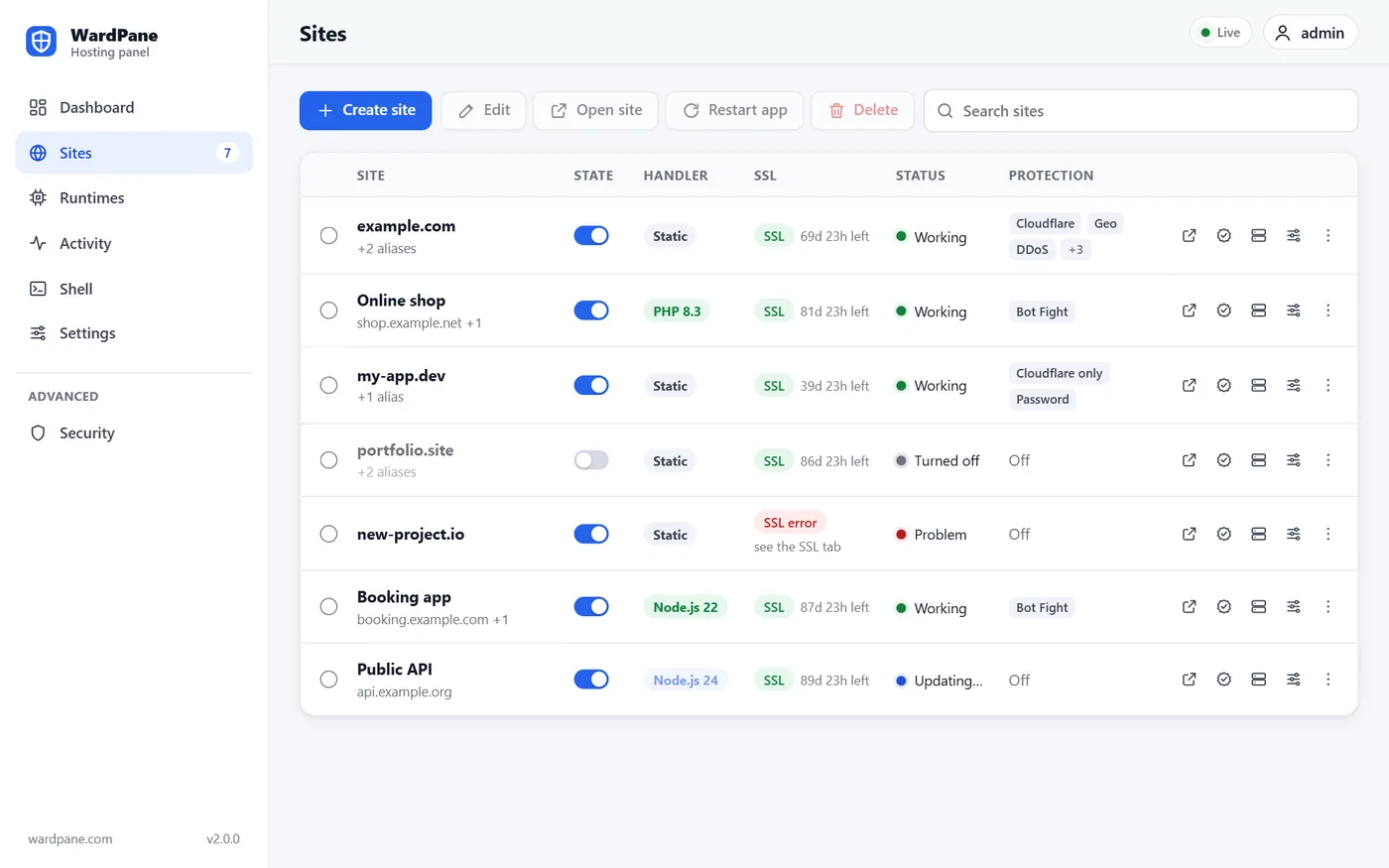
- A site is a domain plus up to 99 aliases (a Let's Encrypt certificate holds at most 100 names). An alias serves the main site or, if it has a folder of its own, that folder. Sites can have a display name.
- Owner layout
- Files live in /var/www/<owner>/data/www/<domain>, with logs and temporary files next to them. The default owner is www-root, a Linux user WardPane creates. Sites from 1.x keep their old folders.
- Three handlers
- No handler (static hosting), PHP or Node.js, chosen per site and switchable at any time. Settings of the other handlers are kept, so switching back restores them.
- Static files
- SPA mode (unknown paths go to index.html), your own 404.html, strong ETags with resumable downloads, HTTP to HTTPS redirect, and symlinks that can never leave the site folder.
- Runtimes
- The panel lists the PHP versions installed on the server and the Node.js majors it supports: 20, 22, 24 and 26, with 24 by default (20 reached end of life in April 2026). Node.js builds come from nodejs.org and are checked against the published SHA256 sums.
- A menu on every site
- Each row of the sites table has a menu with every action for that site, and a switch turns a site off and back on without deleting anything.
- Shell in the browser
- A terminal right in the panel: a root shell in a root session, or the site owner's shell in the site folder. pm2 list and pm2 restart work there for Node.js sites.
- Export and import
- Every site with every setting plus the global blocklist goes into one JSON file. Import merges or replaces, checks the whole file first and never touches files in /var/www.
PHP and Node.js
Each dynamic site runs as its own Linux user inside a systemd sandbox. A broken or hacked site cannot read its neighbours.
- A php-fpm pool per site
- No shared pool, no shared opcache or sessions. The code is read-only for PHP; it can write only to tmp/, logs/, data/ and the folders you list, and PHP never runs from those folders.
- A strict PHP sandbox
- The whole file system is read-only and noexec except php-fpm itself, open_basedir is set, exec, system, shell_exec, proc_open, popen and putenv are disabled, and system calls are filtered.
- .htaccess without Apache
- Rewrite rules, redirects, access rules, Basic auth, headers and caching from real sites work as they are: WordPress, Laravel and the usual HTTPS and www redirects. Lines it cannot apply are shown, never guessed.
- Node.js with PM2
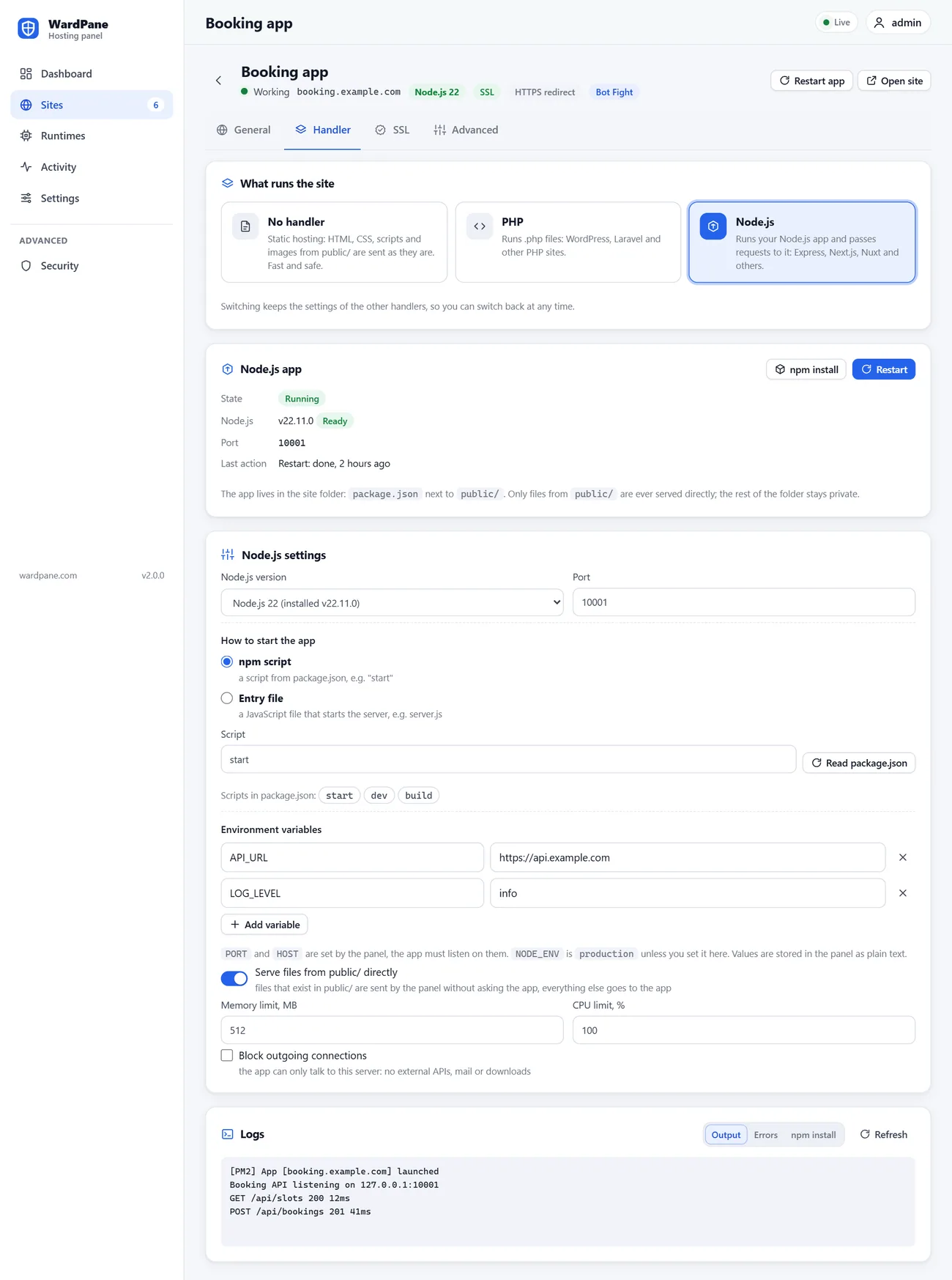
- Pick a Node.js major, an npm script or an entry file, environment variables and limits. One PM2 daemon per owner runs the apps, so pm2 works from the owner's shell.
- The proxy in front of the app
- Files in public/ are served directly if you want, the rest goes to the app with the real visitor IP in X-Forwarded-For and X-Real-IP. WebSockets pass after the same protection checks.
- Restart, npm install and logs
- The Handler tab has buttons for restart and npm install (npm ci when there is a lockfile), the output, error and install logs, and the scripts from package.json to pick from.
Certificates and Cloudflare
Certificates are issued and renewed without manual steps, also for sites behind Cloudflare.
- Let's Encrypt, fully automatic
- One certificate per site with all its aliases, renewed when a third of its life is left. Names whose DNS does not point to the server are skipped and added once it does, and the panel shows why.
- IPv6 checked too
- Let's Encrypt tries IPv6 first, so every AAAA record must point to the server. WardPane checks them before it orders a certificate.
- A certificate for the IP
- The server IP gets a short-lived certificate, renewed every few days. The panel at https://<ip>:1500 opens without a warning.
- Let's Encrypt rate limits
- The panel does not order a duplicate certificate, reports all failed names of an order at once, waits longer after each failure and replaces a deactivated ACME account.
- A Cloudflare token in one click
- The Create Cloudflare token button opens Cloudflare with the right permissions filled in. Paste the token back, and the panel can check and fix the zones of your sites.
Protection
Each site has its own checks, and they run inside the web server before PHP or Node.js see the request. An address is banned only for a clear attack.
- Rate limit and bans
- Each address may send 150 requests in 10 seconds by default. Over the limit it gets a 404 and a ban for the minutes you set. IPv6 visitors are counted and banned by their /64, so changing the address does not help. Each site has an allow list.
- Bot Fight
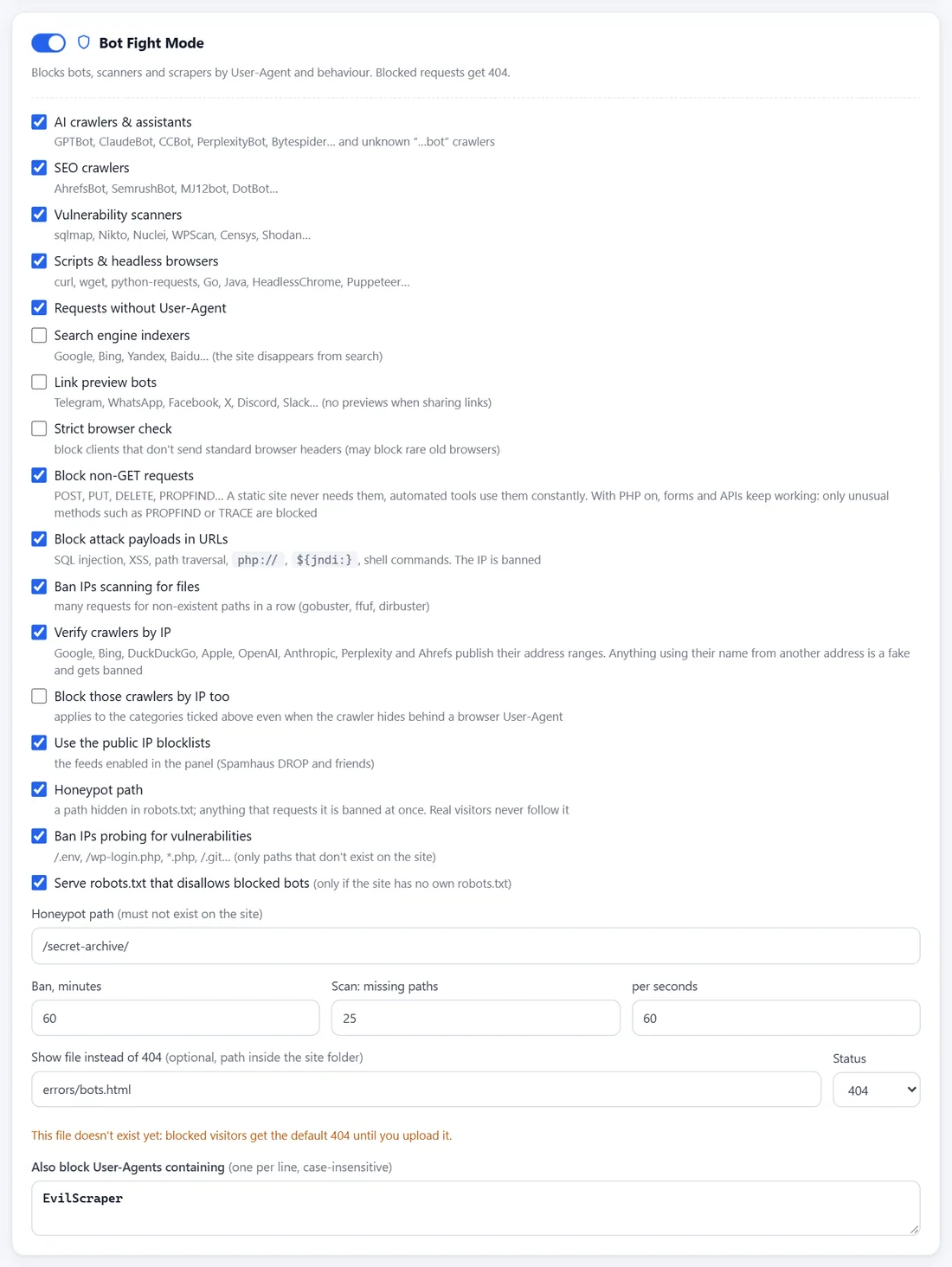
- Blocks AI crawlers, SEO crawlers, vulnerability scanners, scripts and headless browsers, empty user agents and your own list. Search engines and link previews only if you choose. Monitoring and RSS readers are left alone.
- Probes and payloads
- Requests for /.env, /.git, /wp-login.php and similar names that do not exist on the site ban the address. Clear SQL injection, XSS, path traversal and Log4Shell payloads in the URL ban; ambiguous ones only reject that request.
- Scan detection
- Many misses in a row (25 in 60 seconds by default) look like gobuster or ffuf and ban the address. A missing image counts as a tenth of a miss, so an old page with broken pictures is not a scan.
- Verified crawlers
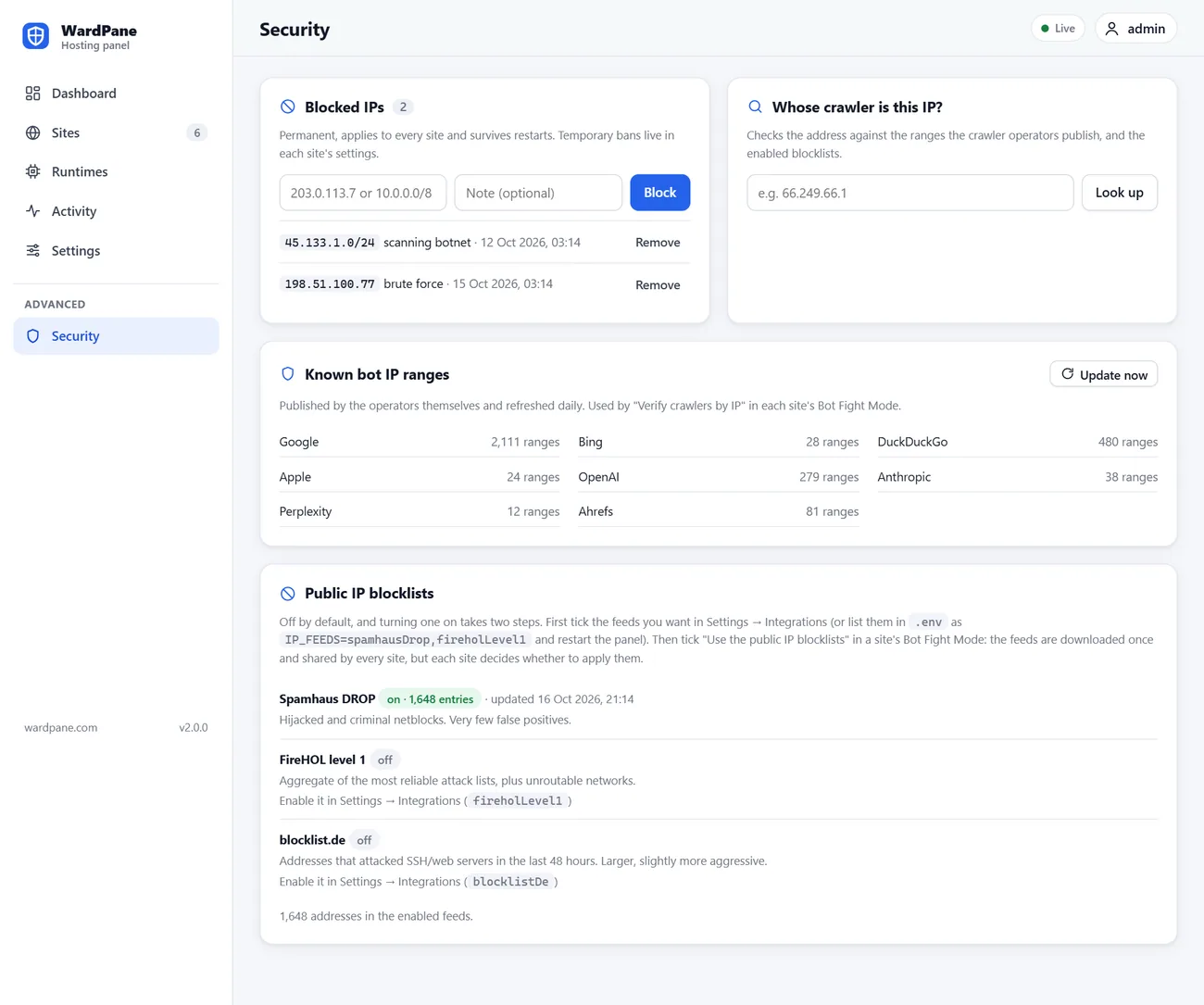
- Google, Bing, DuckDuckGo, Apple, OpenAI, Anthropic, Perplexity and Ahrefs publish their IP ranges. WardPane downloads them daily and bans anyone who claims to be one of them from another address. You can also block these crawlers by IP even when they hide behind a browser user agent.
- Public IP feeds
- Spamhaus DROP, FireHOL level 1 and blocklist.de, refreshed daily, applied per site with one switch.
- Geo with groups
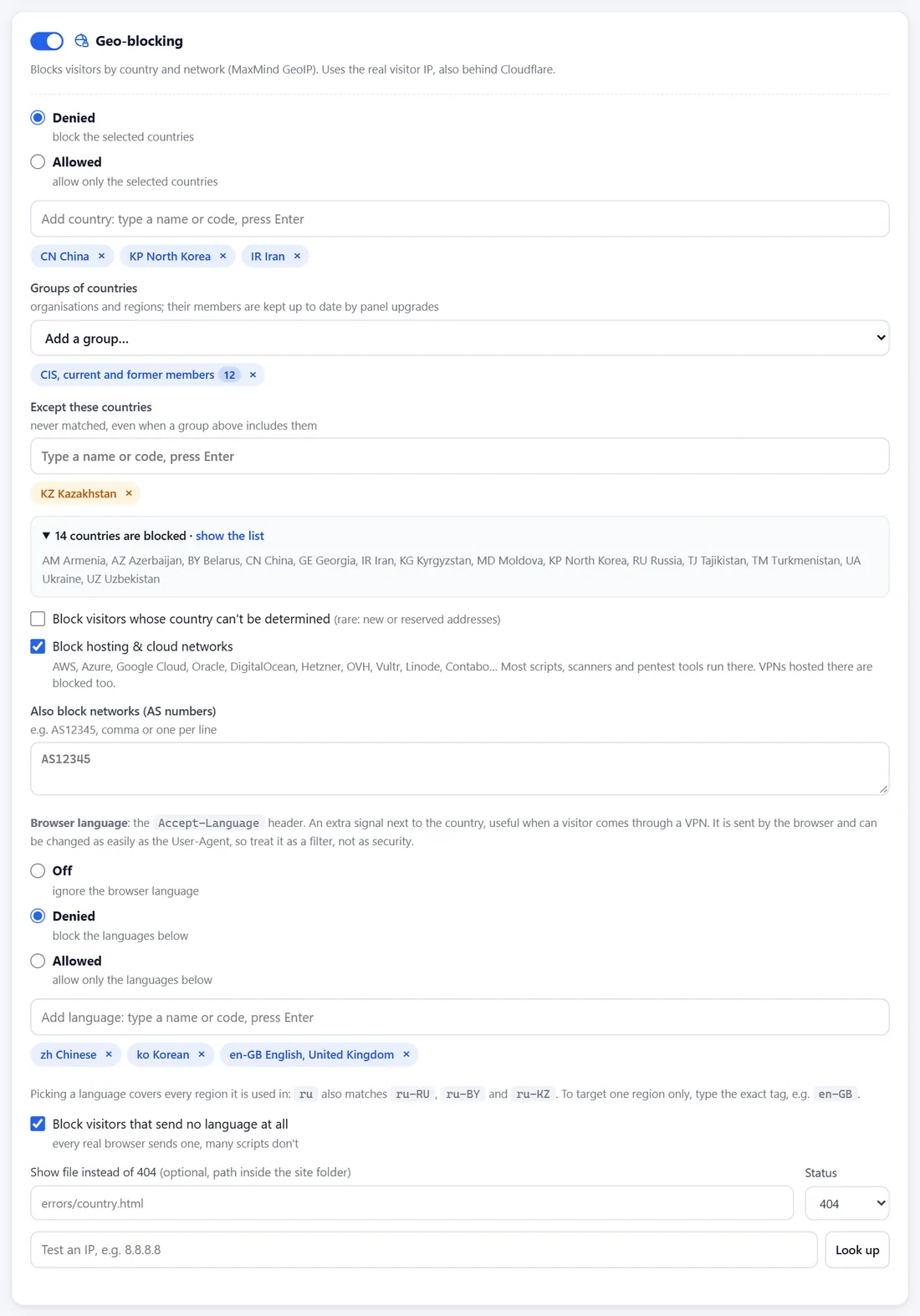
- Allow or deny countries one by one or as groups: former USSR, CIS, EAEU, EU, EEA, Schengen, NATO, G7, G20, OECD, BRICS, SCO, ASEAN, Arab League, Mercosur, continents and more. Add exceptions and see the final list of countries.
- Hosting networks and AS numbers
- Block requests from AWS, Azure, Google Cloud, Hetzner, OVH, DigitalOcean, Vultr and other clouds, where most automation comes from, or from any AS number you list.
- Language filter
- Allow or deny by the browser language, with a separate switch for requests that send no language at all. A useful extra signal next to the country, for example behind a VPN.
- Devices
- Let in only Windows, macOS, Linux, Android, iOS or others, as a filter for ordinary browsers.
- Link only
- Required URL parameters: the site opens only for people who came with your link, for example ?ref=metaads from an ad. A signed cookie and, optionally, the visitor IP keep them in. Paths for webhooks and payment callbacks stay open.
- Password
- HTTP Basic sign-in for drafts and test copies of a site. Passwords are stored as scrypt hashes and checked off the main thread, after every other filter.
- Hotlink protection
- Other sites cannot embed your images and files. Choose the extensions, allowed sites (wildcards work) and what to do with requests without a Referer.
- Security headers
- X-Frame-Options, Referrer-Policy, HSTS with includeSubDomains and preload, Content-Security-Policy and Permissions-Policy per site.
- Honeypot
- A path that robots.txt forbids. A person never opens it, so whoever requests it is banned at once.
- Custom block pages
- Your own page and status code (404, 403 or 200) for devices, bots, geo and link-only blocks, served with no-store.
- Global blocklist
- Addresses and networks blocked on every site, stored on disk and kept across restarts. It applies even where a site has protection off.
Traffic control
Decide who reaches each site, in which order the rules apply and what a blocked visitor sees.
The order of checks on every request
- Cloudflare: real visitor IP, only-through-Cloudflare
- Global blocklist, then the site allow list
- Rate limit and active bans
- Bot Fight: user agents, verified crawlers, IP feeds, probes, payloads, scans, honeypot
- Geo: countries and groups, hosting networks, AS numbers, browser language
- Devices
- Security headers and hotlink protection
- Link only
- Password
- .htaccess rules, then the handler: files, PHP or Node.js
- Cloudflare-aware real IP
- The visitor address is taken from CF-Connecting-IP only when the connection really comes from Cloudflare. The network list is refreshed daily from cloudflare.com.
- Only through Cloudflare
- Direct requests to the server IP get a 404, so nobody can skip the CDN and its rules.
- When the switch is off
- A site behind Cloudflare that is not marked as such never bans Cloudflare addresses and gets a ten times higher limit per Cloudflare server. The log suggests the fix.
- Cloudflare Workers
- Requests from a Worker are counted by its zone with normal limits and bans; the Worker of your own zone is treated as Cloudflare.
- Block page codes
- Use 404 to look like an empty address, 403 to say the request is refused, or 200 with your own page. Rate-limited and banned clients always get a plain 404.
- Cache-safe responses
- Responses that depend on a link pass get Cache-Control: private and Vary: Cookie, so a CDN never hands them to someone without the link.
Panel security
The panel runs as the unprivileged user wardpane, and its sign-in page has its own brute-force limits.
- Root sign-in
- Optionally sign in as root with the server's root password. It is checked by unix_chkpwd through a small root helper on a socket only the panel can open. Off by default.
- Brute-force limits
- 5 failures block an address (for IPv6, its /64) for 15 minutes, and 50 failures block its /48. A wave of failures from many addresses closes sign-in for unknown addresses for 5 minutes. Addresses that signed in during the last 30 days keep working.
- IP allow list
- With PANEL_ALLOW_IPS set, the panel does not answer other addresses at all. It refuses a list that would lock out the address you are using.
- Root helper isolation
- The panel writes the desired state; a root helper started by systemd checks every value again before it creates users, folders and units.
- Sandboxed PHP and Node.js
- Per-site Linux users, read-only system, private /tmp, no new privileges, memory and CPU limits, and optionally no outgoing connections.
- Release checksums
- Every archive is published with its SHA-256 checksum and contains the full source code. The installer downloads it over HTTPS and checks the SHA-256 before it runs anything.
- Updates you can undo
- Each update takes a backup with a restore script, checks that the new version starts and rolls back on its own if it does not.
- Access recovery
- If you lock yourself out, one command on the server resets the panel sign-in and the IP allow list, and lifts sign-in blocks.
Try it on a spare server
Installation takes a few minutes on a clean Ubuntu 24.04.